
Authors

Laryn Kragt Bakker
Technical Lead
Modern editorial workflows continue to move towards a component-first approach with a structured content authoring experience, prioritizing flexibility while still ensuring that there are important guardrails in place. It isn’t always easy to get that right, but recent work on Layout Paragraphs for Backdrop CMS strikes a good balance.
Guiding principles: simplicity, affordability, and backwards compatibility
There are a number of interlocking commitments made by the Backdrop project which feel fairly unique among open source projects:
- simplicity for site builders and editors
- affordability
- backwards compatibility
- long-term maintainability
Those priorities strongly influenced the technical approach behind Layout Paragraphs. Rather than introducing an entirely separate layout system or relying heavily on external UI frameworks, the implementation extends Backdrop’s existing Layout API and editorial patterns. This keeps the authoring experience familiar while reducing maintenance complexity over time.
Especially for organizations with limited development resources, that tradeoff matters. Editorial flexibility is important, but so is long-term sustainability.
Structured content compared to freeform page building
Many visual page builders prioritize layout flexibility, but it often comes at the expense of content structure, consistency, accessibility, or long-term governance. Backdrop’s Paragraphs ecosystem has traditionally taken a different approach, where Paragraph types act as structured content components, allowing site builders to define reusable patterns with clear editorial constraints.
The challenge has been layout flexibility: content editors want to be able to control the layout of this well-structured content in different regions. At times this has ended up with clunky workarounds or brittle solutions. Layout Paragraphs addresses this by combining structured authoring with drag-and-drop layout management that improves the editorial experience and still allows policy-level control over the options that are available for those layouts and regions.
Implementation
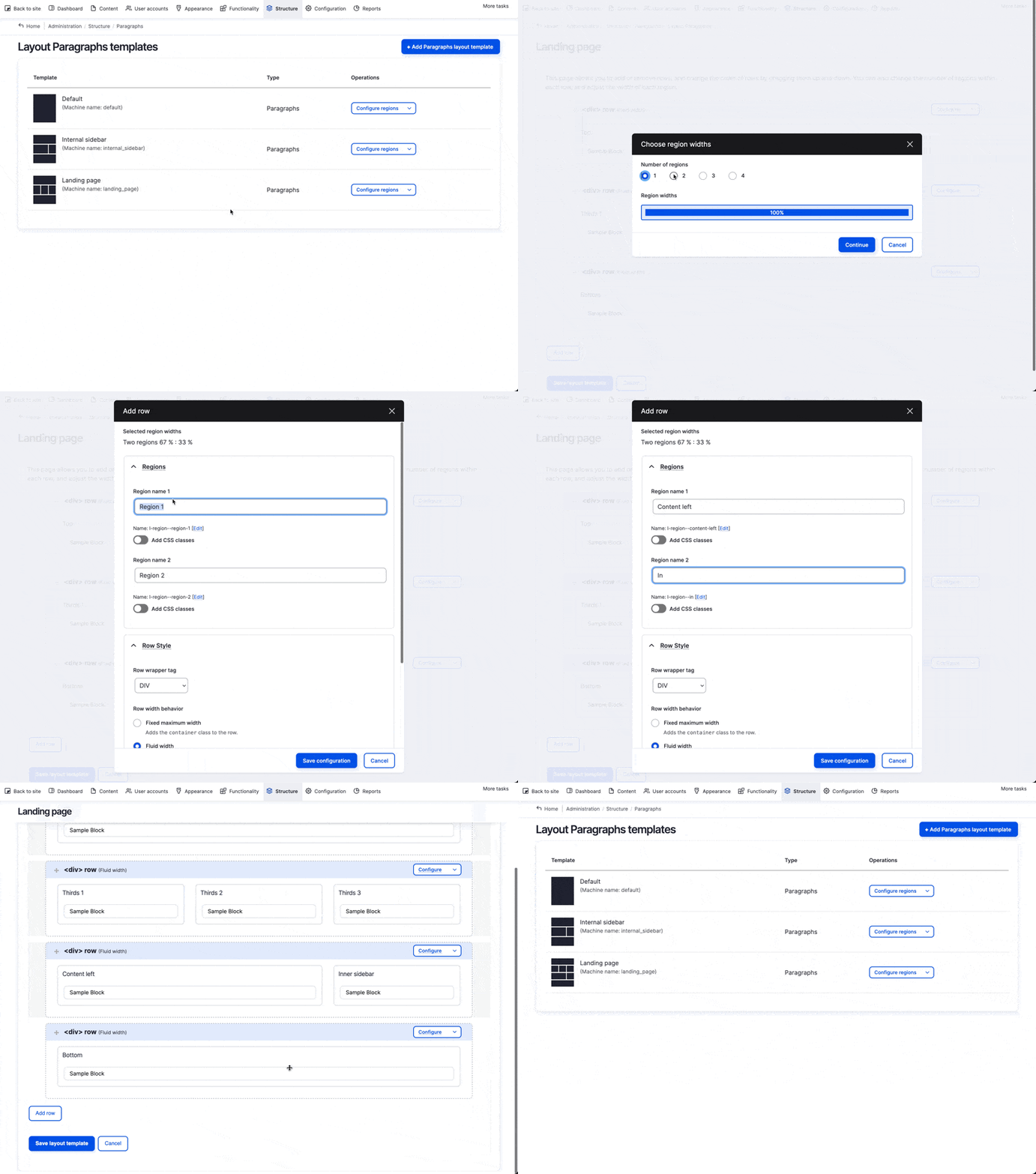
Creating layout templates
After expanding the core Layout API to allow distinctions between types of layouts, it became possible to provide a separate admin page to create, clone and edit layouts for use only with Paragraphs. The interface for creating rows and regions within the layout is verbatim what core provides to create “flexible layout templates” for placing blocks on the page. Reusing core systems is a win-win because it means better maintainability as well as consistency and simplicity for the end users, who don’t need to learn a new interface.
Assigning layout templates to Paragraph fields
In the initial implementation, it will be possible for site builders to make layouts created in this way available to the relevant Paragraph fields. If a single layout template is allowed, it will use it when creating or editing the content, such as a Landing Page template for a Landing Page content type. If multiple layout templates are allowed on the field, an interface to switch the layout that is currently in use will be provided. Switching the layout will reflow the Paragraphs from the currently selected layout and into the new one. (Cloning templates and modifying them will allow “families” of layouts with similar regions that are synchronized during layout template switches so Paragraphs stay in the most appropriate regions.)
In the future, perhaps it will be possible for a user with appropriate permissions to take one of these templates as a base and modify the template on an ad-hoc basis for individual pieces of content, but that is not the first priority. The proposed starting point strikes a balance between standardization and flexibility.
Backwards compatibility
As much as possible (again, think of the “backwards compatibility” principle) the goal is to allow the new functionality to be turned on for a site that already uses Paragraphs, without needing a complete rebuild or content migration into a new schema. When first turning it on, the default layout template will have one region only, and all pre-existing Paragraphs would flow into that one region. The new UI would take effect, but functionally it will allow exactly what was allowed before: moving Paragraphs around vertically. For some, this may be enough. Others will want to adapt and add additional rows and regions and make the layout possibilities more complex. Likewise, at some future point, turning of Layout Paragraphs should attempt to leave all content in the standard/legacy format.
When removing an image style, Backdrop allows you to specify a replacement style and then tries to clean up in the most obvious places by switching configuration to point to the new style. I’ve used this same approach to keep the UI simple and consistent, allowing a replacement template to be selected when deleting an existing template.
Improving the editorial experience
One of the most significant improvements is the editing experience itself. Editors can now:
- place components visually within layouts
- move content between regions with drag-and-drop interactions
- edit components in focused dialogs
- quickly locate component types through filtering and search
Even sites using only a single-column layout benefit from a cleaner and more scalable editing workflow. Importantly, this approach preserves the strengths of structured content: site builders still control which component types are allowed, how previews are rendered, and how layouts are governed across the system.
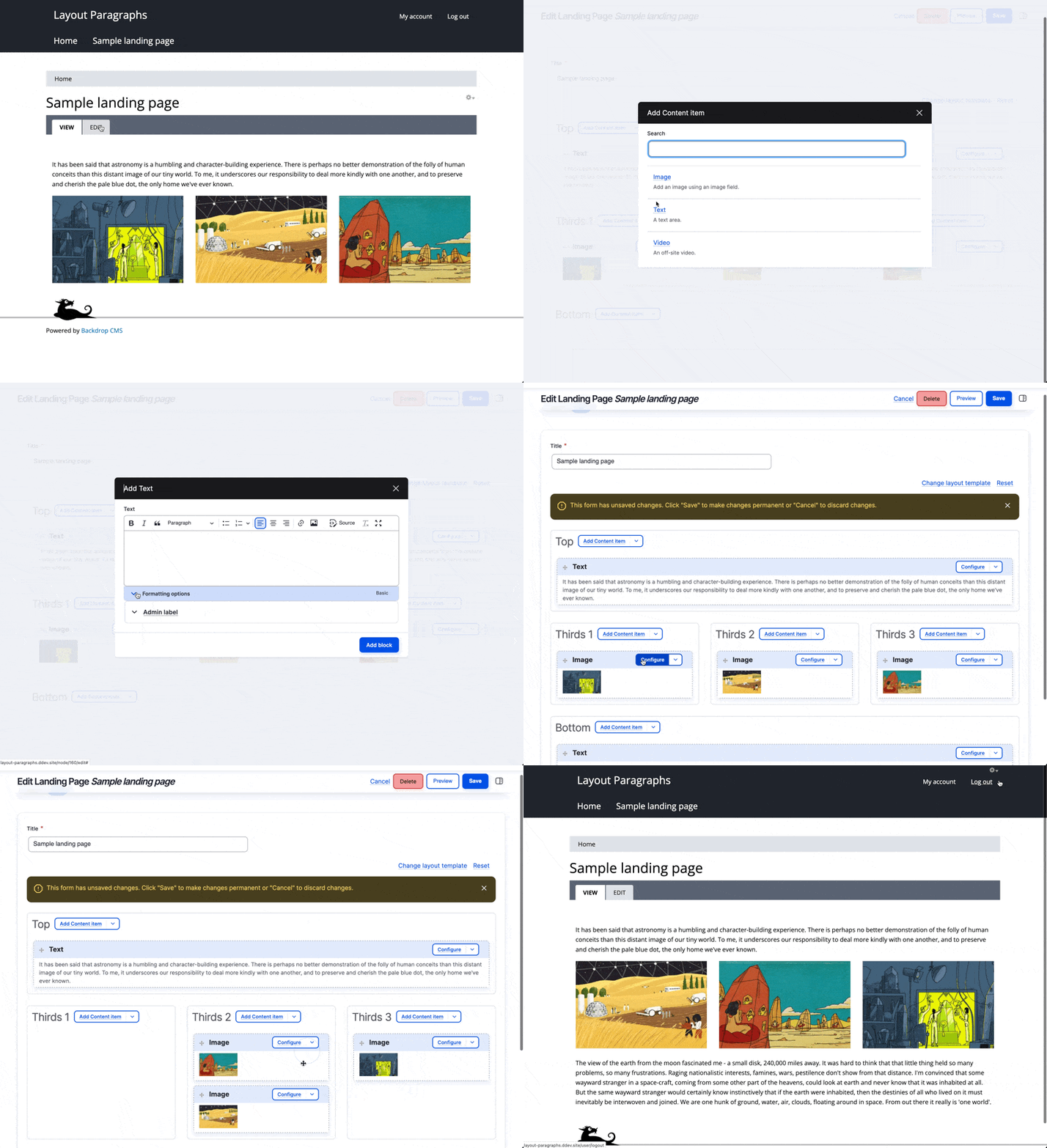
Much of what already worked is retained: you can still specify which Paragraph types are allowed on the field, you still have control over what the editor’s preview of each Paragraph type looks like, and so on.
Another step toward modern structured authoring in Backdrop CMS
As content management systems continue evolving toward component-based architectures, the challenge is no longer simply giving editors more flexibility.
The real challenge is balancing:
- flexibility
- structure
- accessibility
- consistency
- governance
- long-term maintainability
Layout Paragraphs represents an important step in that direction for Backdrop CMS, combining visual layout management with the structured authoring model that many organizations rely on to scale content sustainably over time.
FAQ
What is structured authoring?
Structured authoring is an approach to content management where content is created using predefined content types and reusable components instead of unrestricted rich text editing. Content is stored cleanly in the database instead of being collapsed into rich text fields.
What are Layout Paragraphs?
Layout Paragraphs extends the Paragraphs module to allow structured content components to be placed visually into layout regions using drag-and-drop interactions.
Why does structured content matter?
Structured content improves consistency, accessibility, governance, content reuse, and long-term maintainability.
How does this compare to Layout Paragraphs for Drupal?
Layout Paragraphs for Backdrop is conceptually similar to its Drupal counterpart, but has been implemented differently. This is mainly due to the decision to tie it closely to Backdrop’s own Layout system.