
Authors

Jennifer Dust
Director of Engineering
When travelers check a flight status online, they expect instant, accurate updates—whether they’re at the terminal or planning ahead from home. Tampa International Airport needed a solution that could deliver live flight information quickly, load fast on mobile devices, and meet accessibility standards. We collaborated with their team to create a fast, modern, and accessible React application that presents real-time airline data through an intuitive and mobile-friendly interface. We ended up with a tool that fits seamlessly within Tampa International Airport’s Drupal website while offering an app-like experience optimized for performance and usability.
Balancing real time accuracy and performance
To solve the need for speed and accuracy, we proposed building a React application using TypeScript, FuseJS, and styled-components. This approach allowed us to create a modern experience that was fast on mobile devices while maintaining robust search features. TypeScript provides component reusability, while styled-components handle visual design consistently without extra CSS overhead. Using FuseJS also allowed us to build a robust search without the requirement of a heavier backend library like ElasticSearch or Solr. Fitting all these pieces together we implemented dynamic imports and code splitting, ensuring the application remains lightweight even as new features are added.
The flight data is delivered through an API integration that updates automatically, so travelers always see the latest information without reloading the page. Leveraging the Drupal caching layer to temporarily store recent flight data allowed us to reduce redundant network calls and keep the interface responsive even on slower connections. This balance between real-time accuracy and performance ensures a smooth, dependable experience across all devices.
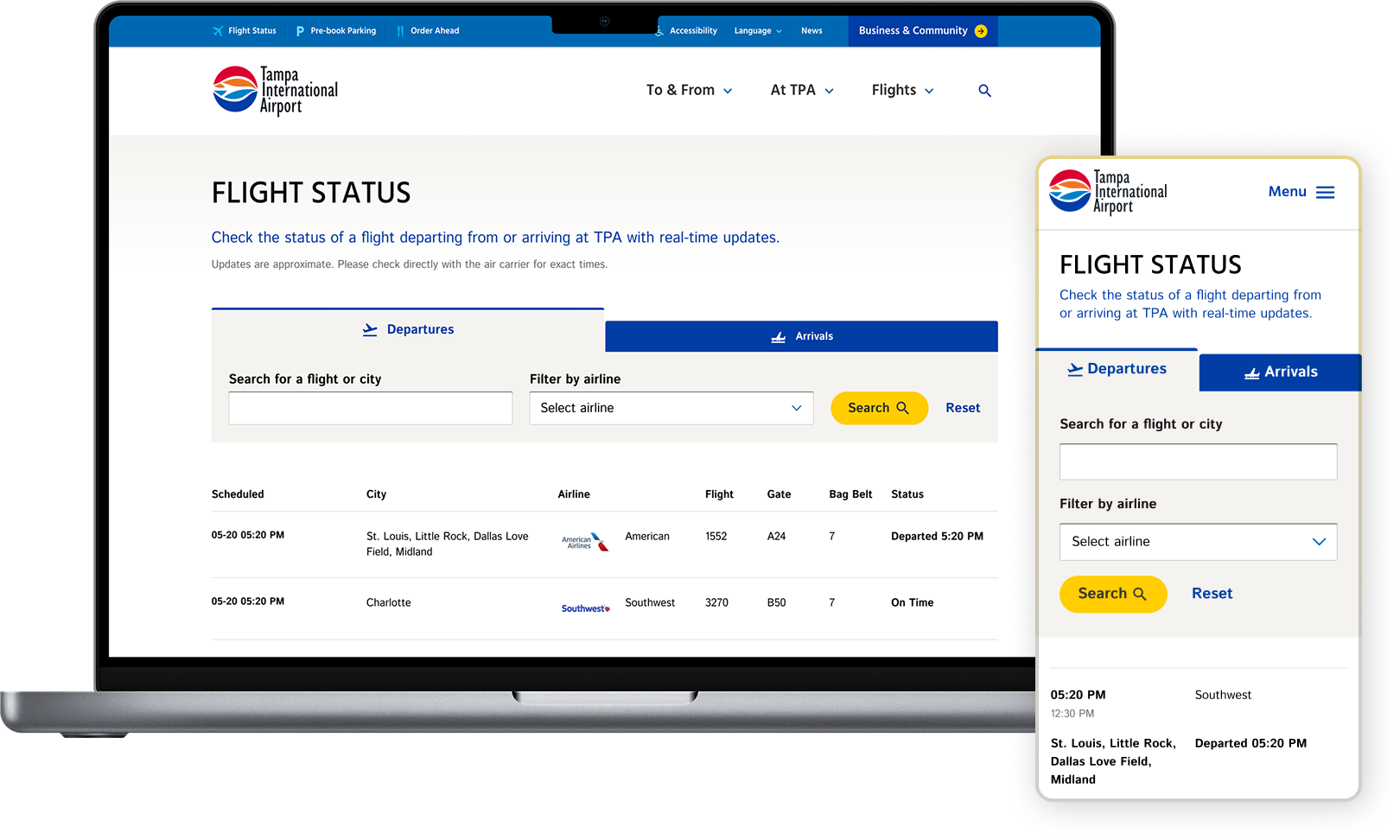
Building a lightweight, real-time flight tracker with React
Since we were working with real-time flight data Typescript played a critical role in modeling flight data and ensuring consistency across components. The strong typing Typescript provides helped ensure that filters, searching, and status updates behaved reliably as the data constantly changed.
A combination of React’s Suspense and lazy imports allows us to start the API immediately upon users visiting the page while the rest of the application is loading. This plays a role regarding how often we fetch the flight status data and how long it takes for information to be displayed to users. This method also provided a catch point for if there is an issue with the endpoint API we have a stylized fallback in place. Data state management was a critical aspect of this project due to the constant changing dates & times regarding flight travel, we needed to make sure that the data was new enough to support users tasks while also not overloading the API endpoint. To achieve this we added a cache status to each API request that is invalidated each time a user refreshes their device or the set cache time was invalidated by Drupal.
Once the data has been retrieved it is formatted to ensure that the correct date & time is being displayed, sorted by scheduled flight date, and then sorted into arrivals and departures. This formatting is a necessary step for how we display the data because of common discrepancies in the provided data from the API. After formatting it is quickly indexed in a provided SearchContext that supports users searching for arrivals/departures, airlines, and flight number or city. Search is a lightweight experience using the FuseJS library which allows for a degree of fuzzy search without the overhead of a larger search backend. Checkout this quick code snippet:
import Fuse from 'fuse.js'

const books = [
  { title: "Old Man's War", author: 'John Scalzi' },
  { title: 'The Lock Artist', author: 'Steve Hamilton' },
  { title: 'JavaScript Patterns', author: 'Stoyan Stefanov' }
]

const fuse = new Fuse(books, {
  keys: ['title', 'author'],
  includeScore: true
})

fuse.search('jon')
// [{ item: { title: "Old Man's War", author: "John Scalzi" }, refIndex: 0, score: 0.25 }]

fuse.search('patterns')
// [{ item: { title: "JavaScript Patterns", ... }, refIndex: 2, score: 0.0 }]
Styled-components allowed us to componentize styles and provided flexibility with style variances and seamless integration with React because it keeps track of which components are rendered on a page and only adds the needed styles without any unnecessary overhead. One risk with this design is that we don’t run into class name bugs conflicting with Drupal styles and prevents overlap. The combination of this allowed us to break this application into less than 10 unique components.
Publishing capabilities of Drupal meet interactivity of React
Even though the flight tracker is a fully self-contained application, it lives inside Tampa International Airport’s Drupal site. That means the airport’s team can manage where and how the tracker appears on the site without touching a line of code. The React app is built and bundled as static assets, then dropped into a Drupal container. Once it’s mounted, React takes over by handling data fetching, rendering, and routing entirely on the client side. This hybrid approach combines the content management power of Drupal with the speed and interactivity of React, giving administrators flexibility to place or update the flight tracker as part of the broader website.
Development centered around speed and accessibility
At the heart of the project was one major challenge: turning constantly changing flight data into something travelers could instantly understand and act on. Our team designed an interface that’s clear, reliable, and accessible so users can filter by flight number, airline, or destination and find what they need in seconds, without clutter or confusion. The flight status application supports full keyboard navigation, allowing assistive technology users to move through filters, search, and review flight results. Whenever filters are applied, the updates clearly announce when the displayed results have changed.
From day one, we treated speed and accessibility as features, not afterthoughts. Travelers don’t want to wait, so the application was engineered to load as fast as possible, filter results instantly, and keep users informed with live data.
The result? A digital experience that feels intuitive and reliable, as easy to navigate as the airport itself.
Read This Next
- Animated Routing in Svelte with {#key}: Transitions Without Manual Cleanup
- Professional development & takeaways from the Wes Bos Master Gatsby course
- Integrating React with Drupal
- Drupal 8 Migration with Multiple Paragraph References
- Handling Time Zones in a Progressively Decoupled Drupal Application